gstack: Garry Tan's Claude Setup Is 🔥
The Y Combinator CEO open-sourced his entire Claude Code workflow. Here are the 10 skills worth knowing — including why office-hours should be the first thing you run on any new idea.
My entire X feed has been talking about gstack this week. I miss SF — used to run into Garry Tan at Laughing Squid events back in the late 2000s. The guy is brilliant. He's at Y Combinator now, and gstack feels like decades of hard-won startup intuition compressed into a Claude context — a gift to the world. This should be every dev shop's default setup.
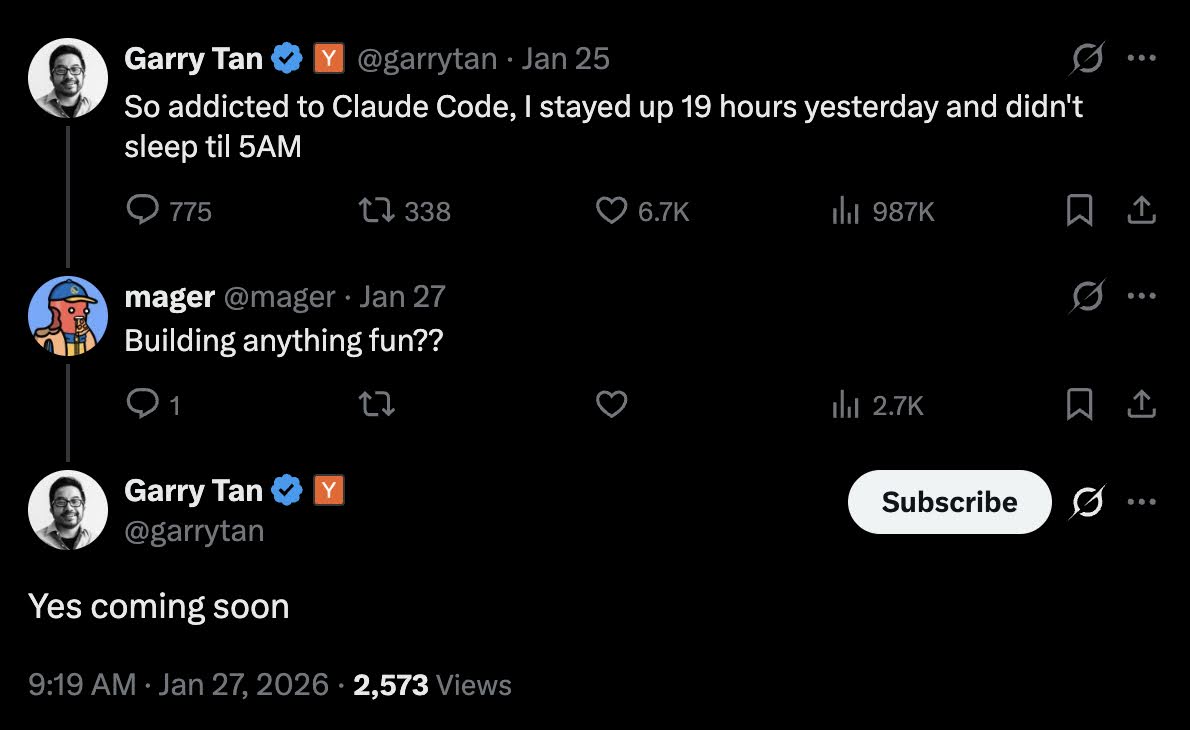
Back in January I asked him if he was building anything fun with Claude Code. He said "Yes coming soon." Was that gstack, I wonder?
Here's what it is, why it's different, and the 10 skills I'm most interested in.
What gstack actually is
Most people use Claude Code as a general-purpose assistant — write this, fix that, review this. Garry's insight is that different phases of software development need different modes of thinking. Planning is not review. Review is not shipping. He wanted explicit gears.
gstack gives you 28 slash commands, each one activating a specialized "cognitive mode." A CEO who challenges your product scope. A staff engineer who locks architecture. A designer who catches AI slop. A security officer running OWASP audits. A QA lead who opens a real browser and tests your app.
Garry claims he's been shipping 10,000–20,000 lines of production code per day, part-time, while running YC full-time. 600,000+ lines in 60 days. Those numbers are big enough that skepticism is fair — but the tooling is real, and you can install it in 30 seconds:
git clone --single-branch --depth 1 https://github.com/garrytan/gstack.git ~/.claude/skills/gstack && cd ~/.claude/skills/gstack && ./setupMIT licensed. Free. Nothing touches your PATH or runs in the background. Everything lives in .claude/.
The 10 skills worth your attention
1. /office-hours — The one to start with
This is the one I want to use most. Before any code gets written, /office-hours acts as a discovery consultant. It asks six forcing questions about what you're actually building — not what you said you're building.
Garry's example in the docs is perfect: you say "daily briefing app for my calendar." Claude pushes back. What you actually described is a personal chief of staff AI. It extracts five capabilities you didn't realize you were describing, challenges four premises, and gives you three implementation approaches with effort estimates.
The recommendation is always the same: ship the narrowest wedge tomorrow, learn from real usage, and treat the full vision as a roadmap.
I've definitely spent 30 minutes spinning on scope before touching code. /office-hours kills that pattern.
2. /plan-ceo-review — The CEO you don't have to hire
This one hit me. It challenges your feature idea through four lenses: expansion, selective expansion, hold, and reduction. It plays the role of a skeptical, experienced product strategist who's seen a thousand startups over-engineer their first version.
For solo founders and small teams, this is legitimately a replacement for a co-founder sanity check or a board member who knows product. You describe the plan, it pushes back, you either defend it or revise it. Either way you ship better.
The "reduction" mode is particularly valuable. It's the thing most product reviews miss — asking what can we cut rather than just validating what's already on the list.
3. /plan-eng-review — Architecture before the code
Once the product direction is locked, this skill activates architect mode. It reviews your technical approach, locks design decisions, maps data flow, and surfaces edge cases before you're knee-deep in implementation.
The killer use case is greenfield projects. Instead of discovering your data model was wrong three sprints in, you run /plan-eng-review first and get an adversarial architecture review in a few minutes.
4. /design-review — Catching AI slop
This is the skill that addresses the problem nobody wants to admit: AI-generated UIs are often visually mediocre. Not broken. Not wrong. Just... safe. Forgettable. Generic Inter font, gradient buttons, cards in cards.
/design-review is a designer-engineer hybrid. It audits the UI, rates each design dimension from 0–10, and then fixes the findings atomically — not just flags them, actually changes them. The goal is to catch the aesthetic compromises that creep in when you let Claude go on autopilot.
I run something similar mentally every time I touch a UI. Having a slash command for it makes the discipline automatic.
5. /review — Staff engineer code review
After you've shipped a feature branch, /review does two things: auto-fixes obvious issues and flags completeness gaps. Not as a gentle suggestions list — as a staff engineer who actually cares about production code and will push back on shortcuts.
The design philosophy is explicit: it won't just surface problems. It fixes what it can and clearly names what it can't. That's the right instinct. Nobody wants a code reviewer who just comments.
6. /qa — Real browser testing
This one does something most skills skip: it opens an actual browser and tests your staging URL. Not a mock. Not a simulated click trace. A real Chromium instance hitting your actual app.
The QA lead runs through user flows, catches regressions, and reports findings with specifics. For solo devs who skip QA because there's no one to do it, this is a significant unlock.
7. /cso — Security audit
The Chief Security Officer skill runs OWASP Top 10 and STRIDE threat modeling against your codebase. It's not a linter. It's a systematic adversarial review of your attack surface.
Most side projects and early-stage products ship with real security holes — not because the founders are careless, but because security review is time-consuming and there's always another feature to ship. /cso doesn't eliminate that problem, but it eliminates the excuse.
8. /careful — The guardrail
This is a different category of skill. Rather than activating a "role," /careful engages a more deliberate, methodical mode. It slows Claude down before potentially destructive operations — database migrations, auth changes, anything touching production state.
Think of it as a diff review for consequences. Before running something that can't be easily rolled back, /careful surfaces the blast radius and asks you to confirm.
9. /guard and /freeze — Project safety modes
/guard adds a persistent safety layer to a session. /freeze locks specified parts of the codebase from modification. These are project-level constraints rather than per-command guardrails.
When you're deep in a codebase with dozens of sessions and you don't want a refactor touching the auth module or the payments logic — /freeze puts that in writing for Claude. It's the kind of discipline that prevents the "I didn't mean to change that" moment at 2am.
10. /retro — Close the loop
After a sprint, /retro generates a structured retrospective: lines changed, commits, patterns, what went well, what to improve next time. It's a forcing function for learning from the work instead of just moving to the next thing.
Garry uses /retro across multiple active projects. His examples in the docs show 140,000+ lines added, 362 commits, ~115k net LOC in a week. Whether or not you're hitting those numbers, the habit of closing the loop is good engineering hygiene.
The bigger picture
The framing I keep coming back to: Garry is shipping more code now than at any point in his career — and he's doing it while running one of the most influential organizations in tech. The leverage isn't about being faster at typing. It's about having the right cognitive modes available at the right stages.
gstack is his attempt to make those modes transferable. The fact that it's open source, MIT-licensed, and installs in 30 seconds means there's no reason not to try it.
I'm putting it in my personal Claude workspace today, and also trying it on my work harness at Uber. I'll run /office-hours on a few things I've been turning over in my head, and I'll report back on Twitter after I've lived with it for a week.
Install gstack: github.com/garrytan/gstack